
Password hygiene is the set of everyday habits that keep account passwords hard to guess, hard to steal, and never reused across services. For a small business it comes down to three things: long passphrases instead of complicated ones, a password manager everyone actually uses, and multi-factor authentication on the accounts that would hurt most to lose.
That is not how most policies are written. Force people to invent something with symbols and change it every 90 days, and they will do exactly what you would expect: reuse a formula, write it on a sticky note, or add "1" to the end. Security theatre, not security. The modern approach is easier for your team and stronger.
CISA, the US government's cyber-defence agency, describes multifactor authentication as "a simple, effective step that can block many common cyberattacks and significantly reduce the risk of account compromise".
You will often see this quoted as "MFA blocks 99% of attacks." We checked, and CISA publishes no such figure. The number traces back to a vendor blog post from 2019. We would rather give you the sentence the agency actually wrote.
Figure verified 31 July 2026. Source linked above.
Why do most password policies backfire?
Because they ask people to do something human memory is bad at, and then punish them every 90 days for it. A rule demanding uppercase, lowercase, a number and a symbol does not produce unpredictable passwords. It produces predictable ones, because almost everyone solves the puzzle the same way: capitalise the first letter, put the number and symbol at the end, and increment the number at each forced reset.
Attackers know the pattern. Cracking tools are built around exactly these substitutions, so "P@ssw0rd!" falls faster than its complexity suggests. Meanwhile the policy pushes the genuinely risky behaviour underground — sticky notes, shared spreadsheets, and the same password on the bank as on the pizza site. The policy feels rigorous and quietly makes things worse. Guidance from the major security bodies moved away from forced complexity years ago; most small-business policies have not caught up.
What actually makes a password strong?
Length, far more than complexity. Every extra character multiplies the possibilities an attacker must work through, while swapping an "a" for an "@" barely changes the arithmetic. A long, memorable passphrase such as "correct-harbor-battery-lamp" is easier to remember and far harder to crack than "P@ssw0rd!".
The practical target is at least 12 characters, built from words you can picture rather than symbols you have to look up. Drop the arbitrary character requirements. Drop the calendar-driven resets too — they give an attacker nothing and give your staff a reason to pick something weaker. Change a password when there is an actual reason: a suspected breach, a departing employee, a shared account that should never have been shared.
Stop forcing periodic resets. They push people toward predictable patterns. Change a password when there is a reason to — not because a calendar said so.
Which two changes matter most?
A password manager for everyone, and multi-factor authentication on the accounts that matter. Together these two do more than every other password rule combined, and neither requires a security specialist to set up.
A password manager generates a unique, strong password for every account and remembers all of them, so your team memorises exactly one master passphrase. That single change eliminates password reuse — the reason one breached website can quietly unlock a dozen of your accounts. It also removes the argument about complexity entirely, because nobody has to invent or recall the passwords any more.
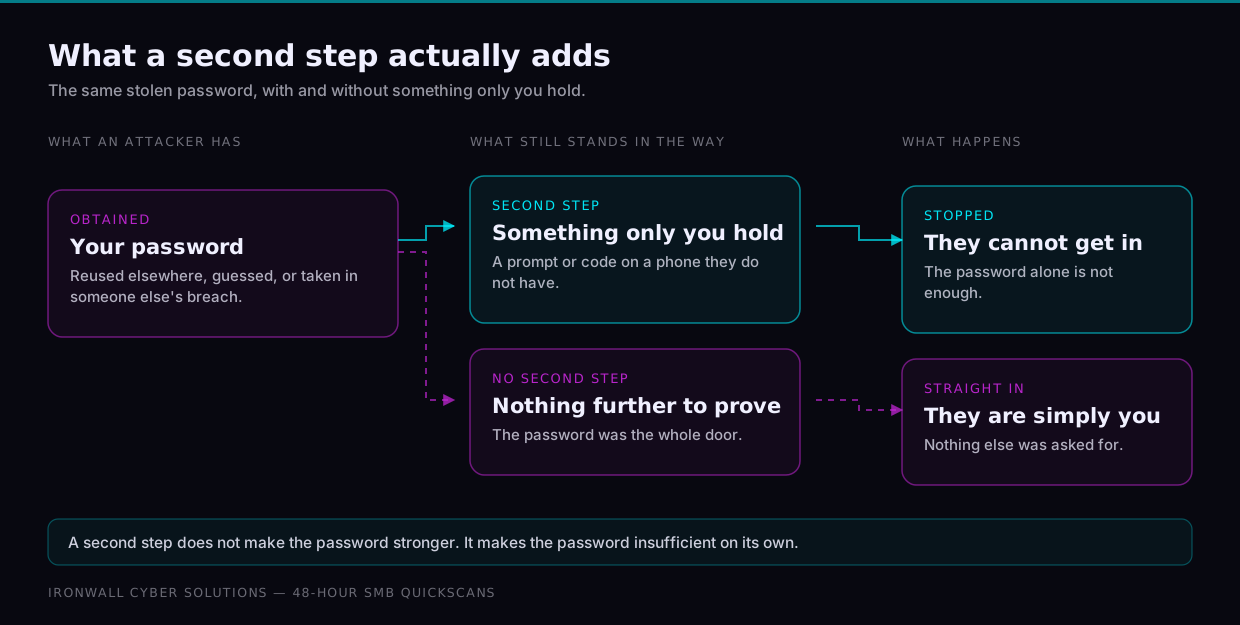
Multi-factor authentication means a stolen password is not enough on its own. Someone who has your password still cannot get in without the second factor. Turn it on for email first, then banking, then any administrator or remote-access account. App-based codes and hardware keys are meaningfully stronger than text-message codes, but any multi-factor authentication beats none — do not let the search for the best option delay turning something on.
What should you protect first?
Not everything at once. Work down this list in order — email sits at the top because it is the account that can reset all the others.
| Account | Why it comes first | Minimum protection |
|---|---|---|
| Business email | It can reset the password on almost every other account you own | Unique passphrase + app-based multi-factor |
| Banking and payments | Direct financial loss, and often the hardest to reverse | Unique passphrase + multi-factor + separate device where offered |
| Admin and remote access | One admin account can expose every other system at once | Unique passphrase + multi-factor + no shared logins |
| Customer data systems | A breach here becomes your customers' problem, and your reputation's | Unique passphrase + multi-factor + access removed when staff leave |
| Everything else | Lower stakes individually, but reuse turns any one of them into a key | Unique password from the manager — never reused from the list above |
How do you get the team to actually use it?
By making the secure path the convenient one, and starting where the payoff is obvious. Password rules fail on adoption far more often than on design, so treat rollout as the real work.
- Introduce the password manager as a time-saver, not a policy. Autofill means people stop typing passwords and stop resetting forgotten ones. That is the argument that wins support — the security benefit arrives whether or not anyone is thinking about security.
- Protect the accounts that matter most first. Email, finance, admin. Getting those three right beats getting thirty low-stakes accounts right.
- Draw a hard line on work passwords at home. A breach on a personal site should never reach your business, and reuse is what connects them.
- Watch for passwords that have already leaked. Most managers flag credentials that have appeared in known breaches, which turns a vague worry into a specific to-do.
- Remove access the day someone leaves. A password manager makes this one action instead of a scavenger hunt.
The bottom line
Good password hygiene in 2026 is simple: long passphrases, a password manager for everyone, multi-factor authentication on what matters, and no more calendar-driven resets. Less friction for your team, and far less risk for your business.